<?xml version="1.0" encoding="utf-8"?>
<feed xmlns="http://www.w3.org/2005/Atom">
    <id>https://docs.memfault.com/embed/linux</id>
    <title>Memfault Docs Blog</title>
    <updated>2022-08-10T14:15:16.000Z</updated>
    <generator>https://github.com/jpmonette/feed</generator>
    <link rel="alternate" href="https://docs.memfault.com/embed/linux"/>
    <subtitle>Memfault Docs Blog</subtitle>
    <icon>https://docs.memfault.com/img/memfault-favicon.png</icon>
    <entry>
        <title type="html"><![CDATA[Getting Started]]></title>
        <id>https://docs.memfault.com/embed/linux/linux-getting-started-guide</id>
        <link href="https://docs.memfault.com/embed/linux/linux-getting-started-guide"/>
        <updated>2022-08-10T14:15:16.000Z</updated>
        <content type="html"><![CDATA[<p>This guide will cover integrating the Memfault Linux SDK into systems built with
<a href="https://www.yoctoproject.org/" target="_blank" rel="noopener noreferrer" class="">Yocto</a>.</p>
<p>When you're done, you will have a basic integration setup that can talk to the
Memfault cloud, enabling one or more of the following features:</p>
<ul>
<li class="">Reporting <a class="" href="https://docs.memfault.com/docs/linux/reboot-reason-tracking">reboot events</a> to Memfault.</li>
<li class="">Reporting <a class="" href="https://docs.memfault.com/docs/linux/metrics">metrics</a>.</li>
<li class=""><a class="" href="https://docs.memfault.com/docs/linux/ota">Over-the-air (OTA) updates</a>.</li>
<li class=""><a class="" href="https://docs.memfault.com/docs/linux/logging">Uploading systems logs</a> to Memfault.</li>
</ul>
<h2 class="anchor anchorTargetStickyNavbar_Vzrq" id="useful-links">Useful links<a href="https://docs.memfault.com/embed/linux/linux-getting-started-guide#useful-links" class="hash-link" aria-label="Direct link to Useful links" title="Direct link to Useful links" translate="no">​</a></h2>
<ul>
<li class="">Memfault's Yocto layer <a href="https://github.com/memfault/memfault-linux-sdk" target="_blank" rel="noopener noreferrer" class="">meta-memfault</a>, to add Memfault to your
build. Make sure to use the <a href="https://github.com/memfault/memfault-linux-sdk/branches" target="_blank" rel="noopener noreferrer" class="">branch matching the Yocto
release</a> that you are using.</li>
<li class="">A <a href="https://github.com/memfault/memfault-linux-sdk/blob/-/meta-memfault-example" target="_blank" rel="noopener noreferrer" class="">sample integration using Yocto</a>.</li>
<li class="">Reference documentation for:<!-- -->
<ul>
<li class=""><code>memfaultd</code> <a class="" href="https://docs.memfault.com/docs/linux/reference-memfaultd-configuration">Configuration file</a>.</li>
<li class=""><a class="" href="https://docs.memfault.com/docs/linux/reference-memfaultctl-cli"><code>memfaultctl</code> CLI</a>.</li>
</ul>
</li>
</ul>
<h2 class="anchor anchorTargetStickyNavbar_Vzrq" id="assumptions-and-dependencies">Assumptions and dependencies<a href="https://docs.memfault.com/embed/linux/linux-getting-started-guide#assumptions-and-dependencies" class="hash-link" aria-label="Direct link to Assumptions and dependencies" title="Direct link to Assumptions and dependencies" translate="no">​</a></h2>
<ul>
<li class="">
<p><code>meta-memfault</code> is verified to work on these releases of Yocto:</p>
<ul>
<li class="">[<code>5.0 scarthgap</code>][yocto-scarthgap]</li>
<li class=""><a href="https://docs.yoctoproject.org/migration-guides/migration-4.0.html" target="_blank" rel="noopener noreferrer" class=""><code>4.0 kirkstone</code></a></li>
<li class=""><a href="https://docs.yoctoproject.org/migration-guides/migration-4.3.html" target="_blank" rel="noopener noreferrer" class=""><code>4.3 nanbield</code></a></li>
<li class=""><a href="https://docs.yoctoproject.org/migration-guides/migration-3.1.html" target="_blank" rel="noopener noreferrer" class=""><code>3.1 dunfell</code></a></li>
</ul>
</li>
<li class="">
<p>For <a class="" href="https://docs.memfault.com/docs/linux/ota">OTA</a>:</p>
<ul>
<li class="">An A/B partition scheme (two partitions for root filesystems, one active and
one to receive the next update). Systems will typically also have a <code>data</code>
partition which is persisted across updates.</li>
<li class=""><a href="https://swupdate.org/" target="_blank" rel="noopener noreferrer" class="">SWUpdate</a> as an OTA update client.</li>
<li class="">A bootloader, configured to collaborate with SWUpdate.
<a href="https://www.denx.de/wiki/U-Boot" target="_blank" rel="noopener noreferrer" class="">U-Boot</a> is often used. The bootloader selects which root
partition to boot from and will switch the active partition after an update.
This setup is very system dependent and beyond the scope of this guide but
our example layer includes SWUpdate and U-Boot configurations for QEMU and
RaspberryPis.</li>
</ul>
</li>
</ul>
<!-- -->
<h2 class="anchor anchorTargetStickyNavbar_Vzrq" id="add-memfaultd-to-your-system">Add <code>memfaultd</code> to your system<a href="https://docs.memfault.com/embed/linux/linux-getting-started-guide#add-memfaultd-to-your-system" class="hash-link" aria-label="Direct link to add-memfaultd-to-your-system" title="Direct link to add-memfaultd-to-your-system" translate="no">​</a></h2>
<div class="theme-admonition theme-admonition-tip admonition_xJq3 alert alert--success"><div class="admonitionHeading_Gvgb"><span class="admonitionIcon_Rf37"><svg viewBox="0 0 12 16"><path fill-rule="evenodd" d="M6.5 0C3.48 0 1 2.19 1 5c0 .92.55 2.25 1 3 1.34 2.25 1.78 2.78 2 4v1h5v-1c.22-1.22.66-1.75 2-4 .45-.75 1-2.08 1-3 0-2.81-2.48-5-5.5-5zm3.64 7.48c-.25.44-.47.8-.67 1.11-.86 1.41-1.25 2.06-1.45 3.23-.02.05-.02.11-.02.17H5c0-.06 0-.13-.02-.17-.2-1.17-.59-1.83-1.45-3.23-.2-.31-.42-.67-.67-1.11C2.44 6.78 2 5.65 2 5c0-2.2 2.02-4 4.5-4 1.22 0 2.36.42 3.22 1.19C10.55 2.94 11 3.94 11 5c0 .66-.44 1.78-.86 2.48zM4 14h5c-.23 1.14-1.3 2-2.5 2s-2.27-.86-2.5-2z"></path></svg></span>tip</div><div class="admonitionContent_BuS1"><p>Keep <a href="https://github.com/memfault/memfault-linux-sdk/blob/-/meta-memfault-example" target="_blank" rel="noopener noreferrer" class=""><code>meta-memfault-example</code></a> open as a reference
implementation. Your integration should look similar to it once you're done
following the steps in this tutorial.</p></div></div>
<p>The <code>memfaultd</code> service is the main orchestrator of the subsystems that conform
and are used by the Memfault Linux SDK. As with all our SDKs, its <a href="https://github.com/memfault/memfault-linux-sdk/blob/-/meta-memfault/recipes-memfault/memfaultd/files/memfaultd" target="_blank" rel="noopener noreferrer" class="">source code
is available on GitHub</a>.</p>
<p>Among its responsibilities are:</p>
<ul>
<li class="">Keeping a queue of items to be uploaded to the Memfault cloud.</li>
<li class="">Uploading that data at a specified interval, and recovering from network
failures using an exponential back-off system, independent of the data
collection interval.</li>
<li class="">Controlling whether data is allowed to be collected (e.g. by user consent)
from a device or not.</li>
<li class="">Adjusting which data is collected based on the <a class="" href="https://docs.memfault.com/docs/platform/fleet-sampling">fleet
sampling</a> configuration of this device.</li>
<li class="">Configuring SWUpdate dynamically to perform OTA updates.</li>
<li class="">Providing configuration access via <a class="" href="https://docs.memfault.com/docs/linux/reference-memfaultctl-cli">memfaultctl</a>
(<code>memfaultctl</code> is a symbolic link to <code>memfaultd</code>).</li>
</ul>
<p><code>memfaultd</code> is required for integration.</p>
<h3 class="anchor anchorTargetStickyNavbar_Vzrq" id="meta-memfault-dependencies">Add <code>meta-memfault</code> layer and dependencies<a href="https://docs.memfault.com/embed/linux/linux-getting-started-guide#meta-memfault-dependencies" class="hash-link" aria-label="Direct link to meta-memfault-dependencies" title="Direct link to meta-memfault-dependencies" translate="no">​</a></h3>
<p>Include the <a href="https://github.com/memfault/memfault-linux-sdk/blob/-/meta-memfault" target="_blank" rel="noopener noreferrer" class=""><code>meta-memfault</code></a> layer in your
<code>bblayers.conf</code> file, alongside dependencies:</p>
<div class="language-conf codeBlockContainer_Ckt0 theme-code-block" style="--prism-background-color:#282c34;--prism-color:#ffffff"><div class="codeBlockContent_QJqH"><pre tabindex="0" class="prism-code language-conf codeBlock_bY9V thin-scrollbar" style="background-color:#282c34;color:#ffffff"><code class="codeBlockLines_e6Vv"><span class="token-line" style="color:#ffffff"><span class="token plain"># Apart from other layers you may already depend on:</span><br></span><span class="token-line" style="color:#ffffff"><span class="token plain">BBLAYERS ?= " \</span><br></span><span class="token-line" style="color:#ffffff"><span class="token plain">    ${YOCTOROOT}/sources/memfault-linux-sdk/meta-memfault \</span><br></span><span class="token-line" style="color:#ffffff"><span class="token plain">    ${YOCTOROOT}/sources/memfault-linux-sdk/meta-rust-bin \</span><br></span><span class="token-line" style="color:#ffffff"><span class="token plain">    ${YOCTOROOT}/sources/meta-openembedded/meta-oe \</span><br></span><span class="token-line" style="color:#ffffff"><span class="token plain">"</span><br></span></code></pre></div></div>
<details class="details_lb9f alert alert--info details_b_Ee" data-collapsed="true"><summary>Rust in Yocto for the Memfault SDK</summary><div><div class="collapsibleContent_i85q"><p><code>memfaultd</code> requires the Rust compiler version <code>1.65.0</code> or higher. Dunfell does
not ship with Rust support and Kirkstone ships with <code>1.59.0</code> so we provide Rust
recipes with the SDK.</p><p>The <code>meta-rust-bin</code> layer included in the <code>memfault-linux-sdk</code> is a slightly
modified version of <a href="https://github.com/rust-embedded/meta-rust-bin" target="_blank" rel="noopener noreferrer" class=""><code>rust-embedded/meta-rust-bin</code></a> . This
version differs from upstream by providing a new class <code>cargo_bin</code> instead of
overriding the <code>cargo</code> class provided by <code>meta-oe</code>.</p><p>We found that overriding <code>cargo</code> often caused problems with some Poky packages,
notably <code>python3-cryptography-native</code>. The modified version that we provide does
not have this issue.</p></div></div></details>
<h3 class="anchor anchorTargetStickyNavbar_Vzrq" id="authorize-memfault-license">Authorize Memfault License<a href="https://docs.memfault.com/embed/linux/linux-getting-started-guide#authorize-memfault-license" class="hash-link" aria-label="Direct link to Authorize Memfault License" title="Direct link to Authorize Memfault License" translate="no">​</a></h3>
<p>Since <code>memfaultd</code> has a commercial license, you'll need to add an exception for
it, for example in your <code>local.conf</code>:</p>
<div class="language-conf codeBlockContainer_Ckt0 theme-code-block" style="--prism-background-color:#282c34;--prism-color:#ffffff"><div class="codeBlockContent_QJqH"><pre tabindex="0" class="prism-code language-conf codeBlock_bY9V thin-scrollbar" style="background-color:#282c34;color:#ffffff"><code class="codeBlockLines_e6Vv"><span class="token-line" style="color:#ffffff"><span class="token plain">LICENSE_FLAGS_ACCEPTED:append = " commercial_memfaultd"</span><br></span></code></pre></div></div>
<h3 class="anchor anchorTargetStickyNavbar_Vzrq" id="optional-use-systemd-as-your-init-system">(Optional) Use systemd as your init system<a href="https://docs.memfault.com/embed/linux/linux-getting-started-guide#optional-use-systemd-as-your-init-system" class="hash-link" aria-label="Direct link to (Optional) Use systemd as your init system" title="Direct link to (Optional) Use systemd as your init system" translate="no">​</a></h3>
<p><code>memfaultd</code> will work with or without systemd. When systemd is available, it
will automatically be used to detect normal reboots and shutdowns (refer to our
<a class="" href="https://docs.memfault.com/docs/linux/reboot-reason-tracking">reboot reason tracking guide</a>).</p>
<p>To use <code>systemd</code> as an init system (using <code>poky</code>), add to your <code>conf/local.conf</code>
file:</p>
<div class="language-conf codeBlockContainer_Ckt0 theme-code-block" style="--prism-background-color:#282c34;--prism-color:#ffffff"><div class="codeBlockContent_QJqH"><pre tabindex="0" class="prism-code language-conf codeBlock_bY9V thin-scrollbar" style="background-color:#282c34;color:#ffffff"><code class="codeBlockLines_e6Vv"><span class="token-line" style="color:#ffffff"><span class="token plain">DISTRO_FEATURES:append = " systemd"</span><br></span><span class="token-line" style="color:#ffffff"><span class="token plain">DISTRO_FEATURES:remove = "sysvinit"</span><br></span><span class="token-line" style="color:#ffffff"><span class="token plain">VIRTUAL-RUNTIME_init_manager = "systemd"</span><br></span><span class="token-line" style="color:#ffffff"><span class="token plain">DISTRO_FEATURES_BACKFILL_CONSIDERED:append = "sysvinit"</span><br></span><span class="token-line" style="color:#ffffff"><span class="token plain">VIRTUAL-RUNTIME_initscripts = ""</span><br></span></code></pre></div></div>
<h3 class="anchor anchorTargetStickyNavbar_Vzrq" id="optional-use-openssl-instead-of-rust-tls">(Optional) Use OpenSSL instead of rust-tls<a href="https://docs.memfault.com/embed/linux/linux-getting-started-guide#optional-use-openssl-instead-of-rust-tls" class="hash-link" aria-label="Direct link to (Optional) Use OpenSSL instead of rust-tls" title="Direct link to (Optional) Use OpenSSL instead of rust-tls" translate="no">​</a></h3>
<p>By default, <code>memfaultd</code> will use the <a href="https://github.com/rustls/rustls" target="_blank" rel="noopener noreferrer" class=""><code>rustls</code></a> TLS library,
which is a full TLS implementation in Rust. We recommend this option for most
users.</p>
<p>In some scenario you may want to use OpenSSL:</p>
<ul>
<li class="">To avoid having two SSL implementations in the system and minimize the size of
the final image.</li>
<li class="">For architectures which are not supported by <code>rustls</code> (notably, <code>mips</code>
variants).</li>
</ul>
<p>To use OpenSSL, set the <code>openssl-tls</code> feature on the <code>memfaultd</code> recipe.</p>
<p>For example, in your Yocto <code>build/local.conf</code>:</p>
<div class="language-conf codeBlockContainer_Ckt0 theme-code-block" style="--prism-background-color:#282c34;--prism-color:#ffffff"><div class="codeBlockContent_QJqH"><pre tabindex="0" class="prism-code language-conf codeBlock_bY9V thin-scrollbar" style="background-color:#282c34;color:#ffffff"><code class="codeBlockLines_e6Vv"><span class="token-line" style="color:#ffffff"><span class="token plain">PACKAGECONFIG:pn-memfaultd := "swupdate coredump logging openssl-tls"</span><br></span></code></pre></div></div>
<h3 class="anchor anchorTargetStickyNavbar_Vzrq" id="optional-add-meta-swupdate-for-ota">(Optional) Add meta-swupdate for OTA<a href="https://docs.memfault.com/embed/linux/linux-getting-started-guide#optional-add-meta-swupdate-for-ota" class="hash-link" aria-label="Direct link to (Optional) Add meta-swupdate for OTA" title="Direct link to (Optional) Add meta-swupdate for OTA" translate="no">​</a></h3>
<p>If you are planning on using <code>swupdate</code> for OTA, you will also need to add the
<code>meta-swupdate</code> layer:</p>
<div class="language-diff codeBlockContainer_Ckt0 theme-code-block" style="--prism-background-color:#282c34;--prism-color:#ffffff"><div class="codeBlockContent_QJqH"><pre tabindex="0" class="prism-code language-diff codeBlock_bY9V thin-scrollbar" style="background-color:#282c34;color:#ffffff"><code class="codeBlockLines_e6Vv"><span class="token-line" style="color:#ffffff"><span class="token plain"># Apart from other layers you may already depend on:</span><br></span><span class="token-line" style="color:#ffffff"><span class="token plain">BBLAYERS ?= " \</span><br></span><span class="token-line" style="color:#ffffff"><span class="token plain">    ${YOCTOROOT}/sources/memfault-linux-sdk/meta-memfault \</span><br></span><span class="token-line" style="color:#ffffff"><span class="token plain">    ${YOCTOROOT}/sources/meta-openembedded/meta-oe \</span><br></span><span class="token-line theme-code-block-highlighted-line" style="color:#ffffff"><span class="token plain">    ${YOCTOROOT}/sources/meta-swupdate \</span><br></span><span class="token-line" style="color:#ffffff"><span class="token plain">"</span><br></span></code></pre></div></div>
<p>You can grab a copy of <code>meta-swupdate</code> from <a href="https://github.com/sbabic/meta-swupdate" target="_blank" rel="noopener noreferrer" class="">the source
repository</a>. Note that <code>meta-oe</code> is a dependency of
<code>meta-swupdate</code>.</p>
<p>And add the necessary dependencies to your image file (<code>swupdate</code> will be
required automatically by the <code>memfaultd</code> recipe as long as the <code>swupdate</code>
feature is active):</p>
<div class="language-text codeBlockContainer_Ckt0 theme-code-block" style="--prism-background-color:#282c34;--prism-color:#ffffff"><div class="codeBlockContent_QJqH"><pre tabindex="0" class="prism-code language-text codeBlock_bY9V thin-scrollbar" style="background-color:#282c34;color:#ffffff"><code class="codeBlockLines_e6Vv"><span class="token-line" style="color:#ffffff"><span class="token plain">IMAGE_INSTALL:append = " \</span><br></span><span class="token-line" style="color:#ffffff"><span class="token plain">    u-boot-env \</span><br></span><span class="token-line" style="color:#ffffff"><span class="token plain">    u-boot-fw-utils \</span><br></span><span class="token-line" style="color:#ffffff"><span class="token plain">"</span><br></span></code></pre></div></div>
<h2 class="anchor anchorTargetStickyNavbar_Vzrq" id="minimal-configuration-of-memfaultd">Minimal Configuration of <code>memfaultd</code><a href="https://docs.memfault.com/embed/linux/linux-getting-started-guide#minimal-configuration-of-memfaultd" class="hash-link" aria-label="Direct link to minimal-configuration-of-memfaultd" title="Direct link to minimal-configuration-of-memfaultd" translate="no">​</a></h2>
<h3 class="anchor anchorTargetStickyNavbar_Vzrq" id="optional-opt-out-of-memfaultd-default-features">(Optional) Opt out of <code>memfaultd</code> default features<a href="https://docs.memfault.com/embed/linux/linux-getting-started-guide#optional-opt-out-of-memfaultd-default-features" class="hash-link" aria-label="Direct link to optional-opt-out-of-memfaultd-default-features" title="Direct link to optional-opt-out-of-memfaultd-default-features" translate="no">​</a></h3>
<p>The <code>memfaultd</code> daemon is modular and you can control which features are
built-in to reduce code size, dependencies and resource usage. By default, all
features are enabled.</p>
<p>The available features are:</p>
<ul>
<li class=""><code>swupdate</code>: used for <a class="" href="https://docs.memfault.com/docs/linux/ota">OTA management</a>.</li>
<li class=""><code>coredump</code>: used for collection of <a class="" href="https://docs.memfault.com/docs/linux/coredumps">coredumps</a>.</li>
<li class=""><code>logging</code>: used to <a class="" href="https://docs.memfault.com/docs/linux/logging">collect and upload</a> logs.</li>
</ul>
<p>Set <code>PACKAGECONFIG</code> for the <code>memfaultd</code> package to control which features are
included in the <code>memfaultd</code> build. For example, you can add a
<code>memfaultd.bbappend</code> recipe with the following contents:</p>
<div class="language-text codeBlockContainer_Ckt0 theme-code-block" style="--prism-background-color:#282c34;--prism-color:#ffffff"><div class="codeBlockContent_QJqH"><pre tabindex="0" class="prism-code language-text codeBlock_bY9V thin-scrollbar" style="background-color:#282c34;color:#ffffff"><code class="codeBlockLines_e6Vv"><span class="token-line" style="color:#ffffff"><span class="token plain">PACKAGECONFIG := "swupdate coredump logging"</span><br></span></code></pre></div></div>
<p>Alternatively, in your <code>local.conf</code> file:</p>
<div class="language-conf codeBlockContainer_Ckt0 theme-code-block" style="--prism-background-color:#282c34;--prism-color:#ffffff"><div class="codeBlockContent_QJqH"><pre tabindex="0" class="prism-code language-conf codeBlock_bY9V thin-scrollbar" style="background-color:#282c34;color:#ffffff"><code class="codeBlockLines_e6Vv"><span class="token-line" style="color:#ffffff"><span class="token plain">PACKAGECONFIG:pn-memfaultd := "swupdate coredump logging"</span><br></span></code></pre></div></div>
<h3 class="anchor anchorTargetStickyNavbar_Vzrq" id="memfault-device-info">Add a <code>memfault-device-info</code> executable to your build<a href="https://docs.memfault.com/embed/linux/linux-getting-started-guide#memfault-device-info" class="hash-link" aria-label="Direct link to memfault-device-info" title="Direct link to memfault-device-info" translate="no">​</a></h3>
<div class="theme-admonition theme-admonition-tip admonition_xJq3 alert alert--success"><div class="admonitionHeading_Gvgb"><span class="admonitionIcon_Rf37"><svg viewBox="0 0 12 16"><path fill-rule="evenodd" d="M6.5 0C3.48 0 1 2.19 1 5c0 .92.55 2.25 1 3 1.34 2.25 1.78 2.78 2 4v1h5v-1c.22-1.22.66-1.75 2-4 .45-.75 1-2.08 1-3 0-2.81-2.48-5-5.5-5zm3.64 7.48c-.25.44-.47.8-.67 1.11-.86 1.41-1.25 2.06-1.45 3.23-.02.05-.02.11-.02.17H5c0-.06 0-.13-.02-.17-.2-1.17-.59-1.83-1.45-3.23-.2-.31-.42-.67-.67-1.11C2.44 6.78 2 5.65 2 5c0-2.2 2.02-4 4.5-4 1.22 0 2.36.42 3.22 1.19C10.55 2.94 11 3.94 11 5c0 .66-.44 1.78-.86 2.48zM4 14h5c-.23 1.14-1.3 2-2.5 2s-2.27-.86-2.5-2z"></path></svg></span>tip</div><div class="admonitionContent_BuS1"><p>You may want to copy over <a href="https://github.com/memfault/memfault-linux-sdk/blob/-/meta-memfault-example/recipes-memfault/memfault-device-info/memfault-device-info.bb" target="_blank" rel="noopener noreferrer" class="">the entire <code>memfault-device-info</code> recipe from our
examples</a> to get started. Make sure
to edit its contents following the steps in this section.</p></div></div>
<p>The <code>memfaultd</code> daemon expects to find a <code>memfault-device-info</code> executable in
<code>$PATH</code>. The <code>memfault-device-info</code> executable is created by you during
integration and is meant to provide device-specific information in order to
identify it in Memfault services. The expected output is in the following
format:</p>
<div class="language-ini codeBlockContainer_Ckt0 theme-code-block" style="--prism-background-color:#282c34;--prism-color:#ffffff"><div class="codeBlockContent_QJqH"><pre tabindex="0" class="prism-code language-ini codeBlock_bY9V thin-scrollbar" style="background-color:#282c34;color:#ffffff"><code class="codeBlockLines_e6Vv"><span class="token-line" style="color:#ffffff"><span class="token key attr-name" style="color:#c5a5c5">MEMFAULT_DEVICE_ID</span><span class="token punctuation" style="color:#8dc891">=</span><span class="token value attr-value" style="color:#8dc891">&lt;device-id&gt;</span><span class="token plain"></span><br></span><span class="token-line" style="color:#ffffff"><span class="token plain"></span><span class="token key attr-name" style="color:#c5a5c5">MEMFAULT_HARDWARE_VERSION</span><span class="token punctuation" style="color:#8dc891">=</span><span class="token value attr-value" style="color:#8dc891">&lt;hardware-version&gt;</span><br></span></code></pre></div></div>
<p>Read more about <a class="" href="https://docs.memfault.com/docs/platform/memfault-terminology#device-id">Device ID</a>, <a class="" href="https://docs.memfault.com/docs/platform/software-version-hardware-version">Software Versions, and Hardware
Versions</a> to better understand these
core Memfault platform concepts.</p>
<p>Here's an example <code>memfault-device-info</code> shell script one might add to
<code>/usr/bin/memfault-device-info</code>:</p>
<div class="language-shell codeBlockContainer_Ckt0 theme-code-block" style="--prism-background-color:#282c34;--prism-color:#ffffff"><div class="codeBlockContent_QJqH"><pre tabindex="0" class="prism-code language-shell codeBlock_bY9V thin-scrollbar" style="background-color:#282c34;color:#ffffff"><code class="codeBlockLines_e6Vv"><span class="token-line" style="color:#ffffff"><span class="token plain">#!/bin/sh</span><br></span><span class="token-line" style="color:#ffffff"><span class="token plain">echo MEMFAULT_DEVICE_ID=$(cat /etc/machine-id)</span><br></span><span class="token-line" style="color:#ffffff"><span class="token plain">echo MEMFAULT_HARDWARE_VERSION=$(dmidecode -s system-product-name)</span><br></span></code></pre></div></div>
<p>The script would output something like this:</p>
<div class="language-shell codeBlockContainer_Ckt0 theme-code-block" style="--prism-background-color:#282c34;--prism-color:#ffffff"><div class="codeBlockContent_QJqH"><pre tabindex="0" class="prism-code language-shell codeBlock_bY9V thin-scrollbar" style="background-color:#282c34;color:#ffffff"><code class="codeBlockLines_e6Vv"><span class="token-line" style="color:#ffffff"><span class="token plain">$ memfault-device-info</span><br></span><span class="token-line" style="color:#ffffff"><span class="token plain">MEMFAULT_DEVICE_ID=4a7d5d74-e8f0-471f-9f8c-23e3dd5ce18c</span><br></span><span class="token-line" style="color:#ffffff"><span class="token plain">MEMFAULT_HARDWARE_VERSION=some-board-rev-1.3</span><br></span></code></pre></div></div>
<p>If you added a recipe named <code>memfault-device-info</code>, don't forget to add it to
your image dependencies:</p>
<div class="language-diff codeBlockContainer_Ckt0 theme-code-block" style="--prism-background-color:#282c34;--prism-color:#ffffff"><div class="codeBlockContent_QJqH"><pre tabindex="0" class="prism-code language-diff codeBlock_bY9V thin-scrollbar" style="background-color:#282c34;color:#ffffff"><code class="codeBlockLines_e6Vv"><span class="token-line" style="color:#ffffff"><span class="token plain">IMAGE_INSTALL:append = " \</span><br></span><span class="token-line theme-code-block-highlighted-line" style="color:#ffffff"><span class="token plain">    memfault-device-info \</span><br></span><span class="token-line" style="color:#ffffff"><span class="token plain">    u-boot-env \</span><br></span><span class="token-line" style="color:#ffffff"><span class="token plain">    u-boot-fw-utils \</span><br></span><span class="token-line" style="color:#ffffff"><span class="token plain">"</span><br></span></code></pre></div></div>
<h3 class="anchor anchorTargetStickyNavbar_Vzrq" id="add-etcmemfaultdconf-to-your-build">Add <code>/etc/memfaultd.conf</code> to your build<a href="https://docs.memfault.com/embed/linux/linux-getting-started-guide#add-etcmemfaultdconf-to-your-build" class="hash-link" aria-label="Direct link to add-etcmemfaultdconf-to-your-build" title="Direct link to add-etcmemfaultdconf-to-your-build" translate="no">​</a></h3>
<div class="theme-admonition theme-admonition-tip admonition_xJq3 alert alert--success"><div class="admonitionHeading_Gvgb"><span class="admonitionIcon_Rf37"><svg viewBox="0 0 12 16"><path fill-rule="evenodd" d="M6.5 0C3.48 0 1 2.19 1 5c0 .92.55 2.25 1 3 1.34 2.25 1.78 2.78 2 4v1h5v-1c.22-1.22.66-1.75 2-4 .45-.75 1-2.08 1-3 0-2.81-2.48-5-5.5-5zm3.64 7.48c-.25.44-.47.8-.67 1.11-.86 1.41-1.25 2.06-1.45 3.23-.02.05-.02.11-.02.17H5c0-.06 0-.13-.02-.17-.2-1.17-.59-1.83-1.45-3.23-.2-.31-.42-.67-.67-1.11C2.44 6.78 2 5.65 2 5c0-2.2 2.02-4 4.5-4 1.22 0 2.36.42 3.22 1.19C10.55 2.94 11 3.94 11 5c0 .66-.44 1.78-.86 2.48zM4 14h5c-.23 1.14-1.3 2-2.5 2s-2.27-.86-2.5-2z"></path></svg></span>tip</div><div class="admonitionContent_BuS1"><p>Find a <a class="" href="https://docs.memfault.com/docs/linux/reference-memfaultd-configuration">full reference on <code>/etc/memfaultd.conf</code> here</a>. You
may want to copy over the entire <a href="https://github.com/memfault/memfault-linux-sdk/blob/-/meta-memfault-example/recipes-memfault/memfaultd/memfaultd.bbappend" target="_blank" rel="noopener noreferrer" class=""><code>memfaultd.bbappend</code> recipe from our
examples</a> to get started. Make sure to edit
its contents following the steps in this section.</p></div></div>
<p>A <a href="https://github.com/memfault/memfault-linux-sdk/blob/-/meta-memfault/recipes-memfault/memfaultd/files/memfaultd/builtin.conf" target="_blank" rel="noopener noreferrer" class="">default <code>memfaultd.conf</code></a> (called <code>builtin.conf</code> in the
source files) is embedded within the <code>memfaultd</code> binary, and the daemon will
fall back to it if <code>/etc/memfaultd.conf</code> does not provide an override for a
specific key. All values in it can be overwritten by adding an
<code>/etc/memfaultd.conf</code> file to your build, e.g. using a <code>bbappends</code> recipe for
<code>memfaultd</code> (see an <a href="https://github.com/memfault/memfault-linux-sdk/blob/-/meta-memfault-example/recipes-memfault/memfaultd/memfaultd.bbappend" target="_blank" rel="noopener noreferrer" class="">example</a>). You may
copy parts of the built-in config (or the whole file) to customize configuration
on your target device.</p>
<p>Note that while the sample file has reasonable defaults for most keys, it cannot
guess a value for some fields such as <code>software_version</code>, <code>software_type</code> or
<code>project_key</code>. Hence, a minimal <code>/etc/memfaultd.conf</code> file should look like
this:</p>
<div class="language-json codeBlockContainer_Ckt0 theme-code-block" style="--prism-background-color:#282c34;--prism-color:#ffffff"><div class="codeBlockContent_QJqH"><pre tabindex="0" class="prism-code language-json codeBlock_bY9V thin-scrollbar" style="background-color:#282c34;color:#ffffff"><code class="codeBlockLines_e6Vv"><span class="token-line" style="color:#ffffff"><span class="token plain">{</span><br></span><span class="token-line" style="color:#ffffff"><span class="token plain">  "software_version": "1.0.0",</span><br></span><span class="token-line" style="color:#ffffff"><span class="token plain">  "software_type": "main",</span><br></span><span class="token-line" style="color:#ffffff"><span class="token plain">  "project_key": "&lt;YOUR_PROJECT_KEY&gt;"</span><br></span><span class="token-line" style="color:#ffffff"><span class="token plain">}</span><br></span></code></pre></div></div>
<p>Note that <code>/etc/memfaultd.conf</code> is designed to be in a read-only filesystem.</p>
<p>Read more about <a class="" href="https://docs.memfault.com/docs/platform/software-version-hardware-version">Software Versions and Hardware
Versions</a> to better understand these
core Memfault platform concepts.</p>
<h3 class="anchor anchorTargetStickyNavbar_Vzrq" id="configure-memfaultd-storage">Configure <code>memfaultd</code> storage<a href="https://docs.memfault.com/embed/linux/linux-getting-started-guide#configure-memfaultd-storage" class="hash-link" aria-label="Direct link to configure-memfaultd-storage" title="Direct link to configure-memfaultd-storage" translate="no">​</a></h3>
<h4 class="anchor anchorTargetStickyNavbar_Vzrq" id="persistent-storage">Persistent storage<a href="https://docs.memfault.com/embed/linux/linux-getting-started-guide#persistent-storage" class="hash-link" aria-label="Direct link to Persistent storage" title="Direct link to Persistent storage" translate="no">​</a></h4>
<p>In <code>/etc/memfaultd.conf</code>:</p>
<div class="language-json codeBlockContainer_Ckt0 theme-code-block" style="--prism-background-color:#282c34;--prism-color:#ffffff"><div class="codeBlockContent_QJqH"><pre tabindex="0" class="prism-code language-json codeBlock_bY9V thin-scrollbar" style="background-color:#282c34;color:#ffffff"><code class="codeBlockLines_e6Vv"><span class="token-line" style="color:#ffffff"><span class="token plain">{</span><br></span><span class="token-line" style="color:#ffffff"><span class="token plain">  ...</span><br></span><span class="token-line theme-code-block-highlighted-line" style="color:#ffffff"><span class="token plain">  "persist_dir": "&lt;YOUR_PERSISTENT_STORAGE_DIR&gt;"</span><br></span><span class="token-line" style="color:#ffffff"><span class="token plain">}</span><br></span></code></pre></div></div>
<p>By default it will be a directory in <code>/media</code>. You will most likely need to
change this to wherever your device stores data in a persistent manner.
Requirements for this directory are:</p>
<ul>
<li class="">That it is writable to by <code>memfaultd</code>.</li>
<li class="">That its data persists after firmware upgrades.</li>
</ul>
<p>Your <code>persist_dir</code> will be written to for the following reasons:</p>
<ul>
<li class="">Save persistent configuration options (<code>enable_data_collection</code> and
<code>enable_dev_mode</code>).</li>
<li class="">Save the internal reboot reason file when memfaultd restarts.</li>
<li class="">Save the Fleet Sampling configuration (only when it changes).</li>
</ul>
<h4 class="anchor anchorTargetStickyNavbar_Vzrq" id="temporary-storage">Temporary storage<a href="https://docs.memfault.com/embed/linux/linux-getting-started-guide#temporary-storage" class="hash-link" aria-label="Direct link to Temporary storage" title="Direct link to Temporary storage" translate="no">​</a></h4>
<p>You can configure <code>memfaultd</code> to use a different folder for data that will be
written more frequently and does not necessarily needs to be persisted across
reboots. You can even decide to store this temporary storage directory on a
temporary filesystem in RAM (<code>tmpfs</code>), although in this case, the data will be
lost if a reboot or crash occurs before the data was uploaded.</p>
<div class="language-json codeBlockContainer_Ckt0 theme-code-block" style="--prism-background-color:#282c34;--prism-color:#ffffff"><div class="codeBlockContent_QJqH"><pre tabindex="0" class="prism-code language-json codeBlock_bY9V thin-scrollbar" style="background-color:#282c34;color:#ffffff"><code class="codeBlockLines_e6Vv"><span class="token-line" style="color:#ffffff"><span class="token plain">{</span><br></span><span class="token-line" style="color:#ffffff"><span class="token plain">  ...</span><br></span><span class="token-line theme-code-block-highlighted-line" style="color:#ffffff"><span class="token plain">  "tmp_dir": "&lt;YOUR_TEMPORARY_STORAGE_DIR&gt;"</span><br></span><span class="token-line" style="color:#ffffff"><span class="token plain">}</span><br></span></code></pre></div></div>
<p>By default the temporary storage directory is the persistent storage directory.
This is the recommended configuration.</p>
<p>This directory will be used for:</p>
<ul>
<li class="">Coredumps</li>
<li class="">Heartbeats (metrics)</li>
<li class="">Logs</li>
<li class="">Storing the boot id of the device across memfaultd restarts</li>
<li class="">Storing the Memfault reboot events queue</li>
</ul>
<p>You can control how much space <code>memfaultd</code> will use as temporary storage. See
our <a class="" href="https://docs.memfault.com/docs/linux/reference-memfaultd-configuration">configuration reference</a> for more context.</p>
<h3 class="anchor anchorTargetStickyNavbar_Vzrq" id="set-enable_data_collection">Set <code>enable_data_collection</code><a href="https://docs.memfault.com/embed/linux/linux-getting-started-guide#set-enable_data_collection" class="hash-link" aria-label="Direct link to set-enable_data_collection" title="Direct link to set-enable_data_collection" translate="no">​</a></h3>
<p>By default, <code>enable_data_collection</code> is <code>false</code> (see the <a href="https://github.com/memfault/memfault-linux-sdk/blob/-/meta-memfault/recipes-memfault/memfaultd/files/memfaultd/builtin.conf" target="_blank" rel="noopener noreferrer" class="">default
configuration</a>). This is to enable asking end users for
consent before collecting or transmitting any data to Memfault services.</p>
<p>Once the end user has given their consent, you can enable data collection like
so:</p>
<div class="language-shell codeBlockContainer_Ckt0 theme-code-block" style="--prism-background-color:#282c34;--prism-color:#ffffff"><div class="codeBlockContent_QJqH"><pre tabindex="0" class="prism-code language-shell codeBlock_bY9V thin-scrollbar" style="background-color:#282c34;color:#ffffff"><code class="codeBlockLines_e6Vv"><span class="token-line" style="color:#ffffff"><span class="token plain">$ memfaultctl enable-data-collection</span><br></span></code></pre></div></div>
<p>To disable it:</p>
<div class="language-shell codeBlockContainer_Ckt0 theme-code-block" style="--prism-background-color:#282c34;--prism-color:#ffffff"><div class="codeBlockContent_QJqH"><pre tabindex="0" class="prism-code language-shell codeBlock_bY9V thin-scrollbar" style="background-color:#282c34;color:#ffffff"><code class="codeBlockLines_e6Vv"><span class="token-line" style="color:#ffffff"><span class="token plain">$ memfaultctl disable-data-collection</span><br></span></code></pre></div></div>
<p>The <code>memfaultd</code> service will restart automatically whenever you run either of
those commands if called with a value different from the current configuration.</p>
<p>Take a look at the <a class="" href="https://docs.memfault.com/docs/linux/reference-memfaultd-configuration"><code>/etc/memfaultd.conf</code> reference</a> for
more information.</p>
<div class="theme-admonition theme-admonition-tip admonition_xJq3 alert alert--success"><div class="admonitionHeading_Gvgb"><span class="admonitionIcon_Rf37"><svg viewBox="0 0 12 16"><path fill-rule="evenodd" d="M6.5 0C3.48 0 1 2.19 1 5c0 .92.55 2.25 1 3 1.34 2.25 1.78 2.78 2 4v1h5v-1c.22-1.22.66-1.75 2-4 .45-.75 1-2.08 1-3 0-2.81-2.48-5-5.5-5zm3.64 7.48c-.25.44-.47.8-.67 1.11-.86 1.41-1.25 2.06-1.45 3.23-.02.05-.02.11-.02.17H5c0-.06 0-.13-.02-.17-.2-1.17-.59-1.83-1.45-3.23-.2-.31-.42-.67-.67-1.11C2.44 6.78 2 5.65 2 5c0-2.2 2.02-4 4.5-4 1.22 0 2.36.42 3.22 1.19C10.55 2.94 11 3.94 11 5c0 .66-.44 1.78-.86 2.48zM4 14h5c-.23 1.14-1.3 2-2.5 2s-2.27-.86-2.5-2z"></path></svg></span>tip</div><div class="admonitionContent_BuS1"><p>To always enable data collection you can include the key
<code>enable_data_collection</code> with the value <code>true</code> in your configuration file.</p></div></div>
<h2 class="anchor anchorTargetStickyNavbar_Vzrq" id="test-the-integration">Test the integration<a href="https://docs.memfault.com/embed/linux/linux-getting-started-guide#test-the-integration" class="hash-link" aria-label="Direct link to Test the integration" title="Direct link to Test the integration" translate="no">​</a></h2>
<p>You can test your integration by rebooting your test device. Then, on the
Memfault app, open <a title="Link to your Project on the Memfault Web App." href="https://app.memfault.com/organizations/-/projects/-/devices"><b>Fleet → Devices</b></a> and check that your device shows up. If you open
the specific device, you should be able to find its reboot events under the
<strong>Reboots</strong> tab.</p>
<p>If you encounter any issues in your data transfer implementation, Memfault has tools to help debug!</p><ul><li>To troubleshoot data not getting uploaded or processed correctly by the Memfault cloud, take a look at the<!-- --> <a title="Link to your Project on the Memfault Web App." href="https://app.memfault.com/organizations/-/projects/-/integration-hub/processing-log"> <!-- -->Integration Hub → Processing Log<!-- --> </a> <!-- -->view. This provides a filterable, chronological view of recent errors that have occurred while processing received data. See<!-- --> <a href="https://docs.memfault.com/docs/platform/integration-hub">this documentation page</a> <!-- -->for more information on the Integration Hub.</li><li>Server-side rate limiting will apply to the device you're using to work on the integration process. Once you can see the device on the Memfault Web App, consider enabling<!-- --> <a href="https://docs.memfault.com/docs/platform/rate-limiting#server-side-developer-mode">Server-Side Developer Mode</a> <!-- -->for it on the Memfault Web App to temporarily bypass these limits.</li></ul>
<p>Enabling <a class="" href="https://docs.memfault.com/docs/linux/reference-memfaultctl-cli#developer-mode">device-side developer mode</a> and lowering
<code>upload_interval_seconds</code> and <code>heartbeat_interval_seconds</code> in
<a class="" href="https://docs.memfault.com/docs/linux/reference-memfaultd-configuration"><code>/etc/memfaultd.conf</code></a> can also be helpful during
integration and testing to see reporting from your device as quickly as
possible. The <code>memfaultctl sync</code> command can also be used to manually sync data
between your device and Memfault.</p>
<h2 class="anchor anchorTargetStickyNavbar_Vzrq" id="integration-next-steps">Integration next-steps<a href="https://docs.memfault.com/embed/linux/linux-getting-started-guide#integration-next-steps" class="hash-link" aria-label="Direct link to Integration next-steps" title="Direct link to Integration next-steps" translate="no">​</a></h2>
<p>Congratulations! 🎉 Memfault is running in your product. You will start getting
useful insights automatically.</p>
<p>To get more value from Memfault, we recommend the following steps.</p>
<h3 class="anchor anchorTargetStickyNavbar_Vzrq" id="reboot-reasons">Reboot reasons<a href="https://docs.memfault.com/embed/linux/linux-getting-started-guide#reboot-reasons" class="hash-link" aria-label="Direct link to Reboot reasons" title="Direct link to Reboot reasons" translate="no">​</a></h3>
<p>Memfault will automatically classify some reboots such as kernel panics, user
triggered reboot and OTA updates.</p>
<p>For other reboot reasons that are specific to your product, you can inform
<code>memfaultd</code> before restarting the system. Memfault Dashboard will then give you
an accurate picture of why your devices are restarting.</p>
<p>Our <a class="" href="https://docs.memfault.com/docs/linux/reboot-reason-tracking">Reboot Reason Tracking Guide</a> presents several
mechanisms to do this.</p>
<h3 class="anchor anchorTargetStickyNavbar_Vzrq" id="coredumps">Coredumps<a href="https://docs.memfault.com/embed/linux/linux-getting-started-guide#coredumps" class="hash-link" aria-label="Direct link to Coredumps" title="Direct link to Coredumps" translate="no">​</a></h3>
<p><code>memfaultd</code> will automatically configure the kernel to capture coredumps and
upload them to Memfault.</p>
<p>Follow our <a class="" href="https://docs.memfault.com/docs/linux/coredumps">Coredumps Guide</a> to upload debug symbols to
Memfault during your build process. This is required for Memfault coredump
analysis to work.</p>
<h3 class="anchor anchorTargetStickyNavbar_Vzrq" id="python-exceptions">Python Exceptions<a href="https://docs.memfault.com/embed/linux/linux-getting-started-guide#python-exceptions" class="hash-link" aria-label="Direct link to Python Exceptions" title="Direct link to Python Exceptions" translate="no">​</a></h3>
<p>Python programs do not generate coredumps and their errors are therefore not
captured by default. Instead, they dump a stack trace when an exception is
encountered.</p>
<p>To capture Python exceptions, we provide the
<a href="https://github.com/memfault/pyfault" target="_blank" rel="noopener noreferrer" class="">pyfault</a> library. This library embeds into
your python program installing a custom handler in the <code>sys.excepthook</code>. This
converts the typical python stacktrace into the custom trace format expected by
memfaultd and sends it to memfaultd over http. See the
<a href="https://github.com/memfault/pyfault/blob/main/README.md" target="_blank" rel="noopener noreferrer" class="">readme</a> for more in
depth information on installation and usage.</p>
<h3 class="anchor anchorTargetStickyNavbar_Vzrq" id="metrics">Metrics<a href="https://docs.memfault.com/embed/linux/linux-getting-started-guide#metrics" class="hash-link" aria-label="Direct link to Metrics" title="Direct link to Metrics" translate="no">​</a></h3>
<p>By default, <code>memfaultd</code> will capture system metrics and provide an overview of
the performance of the system.</p>
<p>Our <a class="" href="https://docs.memfault.com/docs/linux/metrics">Metrics Guide</a> explains how to collect custom
application-specific metrics from your system.</p>
<h3 class="anchor anchorTargetStickyNavbar_Vzrq" id="logging">Logging<a href="https://docs.memfault.com/embed/linux/linux-getting-started-guide#logging" class="hash-link" aria-label="Direct link to Logging" title="Direct link to Logging" translate="no">​</a></h3>
<p>If you are using <code>systemd</code>, log collection will be handled automatically by
<code>memfaultd</code>. Refer to our <a class="" href="https://docs.memfault.com/docs/linux/logging">Linux Logging Guide</a> for details
on how this feature can be configured and how to collect logs on non-<code>systemd</code>
systems.</p>
<h3 class="anchor anchorTargetStickyNavbar_Vzrq" id="ota">OTA<a href="https://docs.memfault.com/embed/linux/linux-getting-started-guide#ota" class="hash-link" aria-label="Direct link to OTA" title="Direct link to OTA" translate="no">​</a></h3>
<p>A working OTA setup will require collaboration between the bootloader, the
updater (for example <code>swupdate</code>) and <code>memfaultd</code>. You will also need to
configure your build process to generate update images in a format compatible
with the updater.</p>
<p>Follow our <a class="" href="https://docs.memfault.com/docs/linux/ota">Embedded Linux OTA Integration Guide</a> to configure
and use OTA.</p>]]></content>
    </entry>
    <entry>
        <title type="html"><![CDATA[Introduction]]></title>
        <id>https://docs.memfault.com/embed/linux/introduction</id>
        <link href="https://docs.memfault.com/embed/linux/introduction"/>
        <updated>2022-06-13T10:08:22.000Z</updated>
        <content type="html"><![CDATA[<div class="theme-admonition theme-admonition-tip admonition_xJq3 alert alert--success"><div class="admonitionHeading_Gvgb"><span class="admonitionIcon_Rf37">💡</span>Try the Sandbox</div><div class="admonitionContent_BuS1"><a href="https://demo.memfault.com/demo/start" target="_blank" rel="noopener">Try an interactive sandbox</a> <!-- -->where you can explore Memfault without having to sign up.</div></div>
<p>Ship hardware products at the speed of software. With Memfault, you can
continuously monitor devices, debug firmware issues, and deploy OTA updates to
your fleet.</p>
<h2 class="anchor anchorTargetStickyNavbar_Vzrq" id="overview">Overview<a href="https://docs.memfault.com/embed/linux/introduction#overview" class="hash-link" aria-label="Direct link to Overview" title="Direct link to Overview" translate="no">​</a></h2>
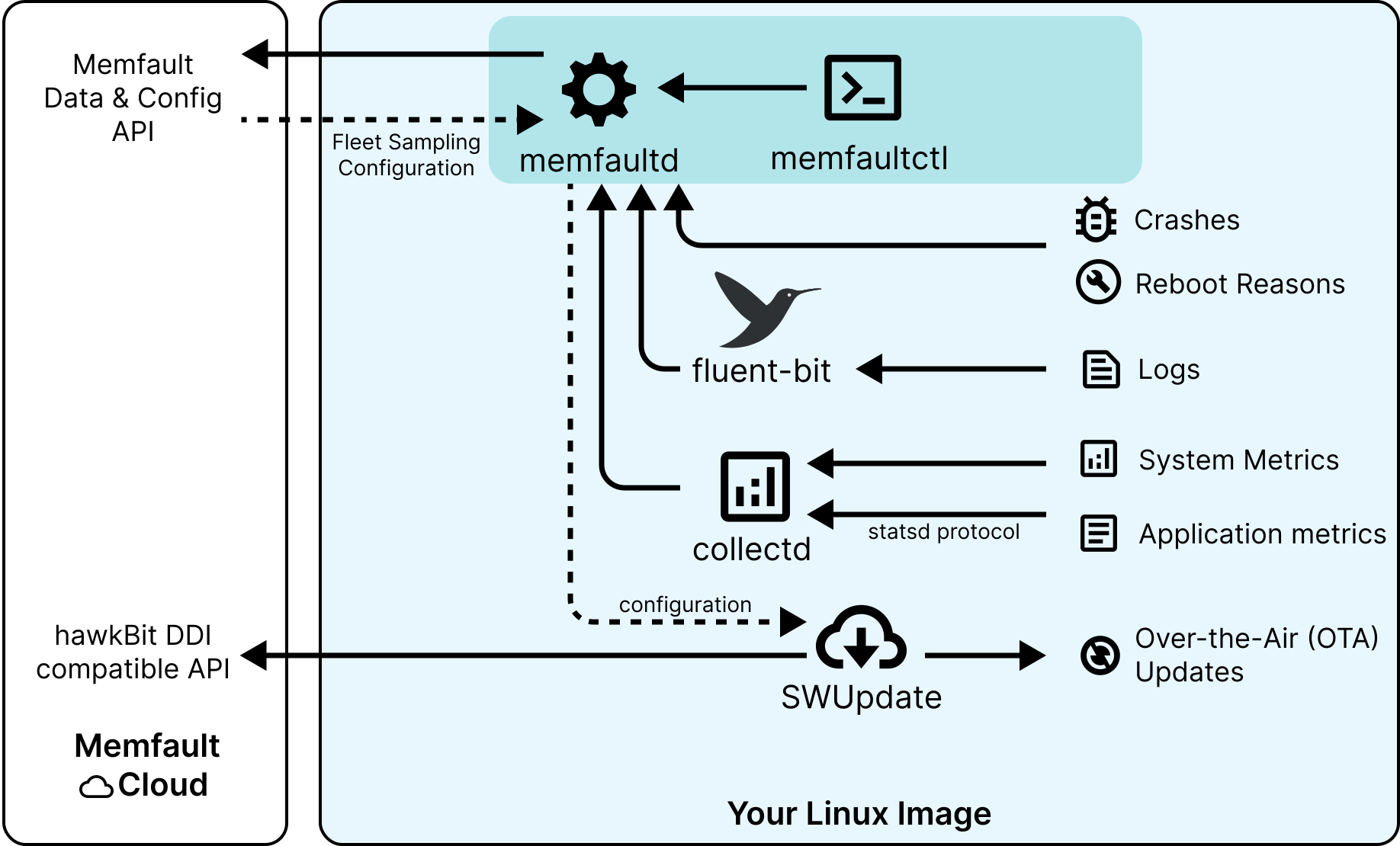
<p>The Memfault Linux SDK is centered around Memfault's Linux daemon, <code>memfaultd</code>.
<code>memfaultd</code> is a lightweight program designed to run as a service on a Linux
system to capture logs, metrics, coredumps, and reboots and upload them to
Memfault. <code>memfaultctl</code>, a command line interface to control <code>memfaultd</code>, and
<code>memfault-core-handler</code>, specifically designed to capture coredumps generated by
crashes on the system, are installed alongside <code>memfaultd</code> automatically.</p>
<figure class="figure_SMyf" style="--figure-bg-color:transparent"><a href="https://docs.memfault.com/img/docs/linux/sdk-overview.svg" target="_blank" class="link_rHrz"><img src="https://docs.memfault.com/img/docs/linux/sdk-overview.svg" class="image_e9uR" alt="Overview of the Memfault Linux SDK"></a><figcaption class="caption_ns13"><p>Dotted lines represent runtime configuration, and solid lines represent flow
of data.</p></figcaption></figure>
<p>Our Linux SDK (just as MCU and Android) is distributed in <a href="https://github.com/memfault/memfault-linux-sdk/blob/-/meta-memfault/recipes-memfault/memfaultd/files/memfaultd" target="_blank" rel="noopener noreferrer" class="">source available
form</a>.</p>
<h2 class="anchor anchorTargetStickyNavbar_Vzrq" id="supported-linux-variants">Supported Linux Variants<a href="https://docs.memfault.com/embed/linux/introduction#supported-linux-variants" class="hash-link" aria-label="Direct link to Supported Linux Variants" title="Direct link to Supported Linux Variants" translate="no">​</a></h2>
<p>Memfault will run on any Linux system.</p>
<ul>
<li class="">For users of <a href="https://www.yoctoproject.org/" target="_blank" rel="noopener noreferrer" class="">Yocto</a>, we provide a <a href="https://github.com/memfault/memfault-linux-sdk/blob/-/meta-memfault" target="_blank" rel="noopener noreferrer" class="">Yocto
layer</a>. The <a class="" href="https://docs.memfault.com/docs/linux/yocto-integration-guide">Yocto Integration Guide</a>
provides detailed instructions on how to integrate the SDK into your Yocto
build. This Yocto layer provides a reproducible way to add Memfault to your
distro and easily pull in new updates.</li>
<li class="">For users of Debian, Raspbian and Ubuntu, we recommend building
<a href="https://github.com/memfault/memfault-linux-sdk/blob/-/meta-memfault/recipes-memfault/memfaultd/files/memfaultd" target="_blank" rel="noopener noreferrer" class="">memfaultd</a> from source. The <a class="" href="https://docs.memfault.com/docs/linux/cross-compile-memfaultd">Cross Compilation
guide</a> guide provides detailed instructions on how to
cross-compile <code>memfaultd</code> for your target architecture and install required
dependencies.</li>
<li class="">For users of Buildroot and OpenWRT, we currently also recommend following the
<a class="" href="https://docs.memfault.com/docs/linux/cross-compile-memfaultd">Cross-Compilation guide</a> guide to cross-compile the
SDK for your target architecture and generate a binary.<br> An alternative is
to write a recipe for your build system that builds the SDK from source. We
will be publishing such recipes in the future.</li>
<li class="">For every other build system or distribution, building the SDK from source is
our recommended option at the moment. <a href="https://mflt.io/contact-support" target="_blank">Contact
us</a> with the details of your setup so we can help you get
started.</li>
</ul>
<h2 class="anchor anchorTargetStickyNavbar_Vzrq" id="documentation-and-features">Documentation and Features<a href="https://docs.memfault.com/embed/linux/introduction#documentation-and-features" class="hash-link" aria-label="Direct link to Documentation and Features" title="Direct link to Documentation and Features" translate="no">​</a></h2>
<p>If you are not familiar with Memfault, we recommend visiting our <a class="" href="https://docs.memfault.com/docs/platform/introduction">features
overview</a> for a generic introduction to all the major
features of the Memfault platform.</p>
<p>Detailed documentation for each feature of the Memfault Linux SDK can be found
in our <a class="" href="https://docs.memfault.com/docs/linux/subsystem-guides">subsystem guides</a>.</p>
<h3 class="anchor anchorTargetStickyNavbar_Vzrq" id="yocto-integration-example">Yocto Integration Example<a href="https://docs.memfault.com/embed/linux/introduction#yocto-integration-example" class="hash-link" aria-label="Direct link to Yocto Integration Example" title="Direct link to Yocto Integration Example" translate="no">​</a></h3>
<p>A complete Yocto integration example can be found under
<a href="https://github.com/memfault/memfault-linux-sdk/blob/-/meta-memfault-example" target="_blank" rel="noopener noreferrer" class=""><code>/meta-memfault-example</code></a>. The central part of the SDK
lives in a Yocto layer in <a href="https://github.com/memfault/memfault-linux-sdk/blob/-/meta-memfault" target="_blank" rel="noopener noreferrer" class=""><code>/meta-memfault</code></a>.</p>
<h3 class="anchor anchorTargetStickyNavbar_Vzrq" id="ota-updates">OTA Updates<a href="https://docs.memfault.com/embed/linux/introduction#ota-updates" class="hash-link" aria-label="Direct link to OTA Updates" title="Direct link to OTA Updates" translate="no">​</a></h3>
<p>To provide <a class="" href="https://docs.memfault.com/docs/linux/ota">OTA Updates</a>, the Memfault Cloud implements an API
endpoint compatible with the <a href="https://www.eclipse.org/hawkbit/apis/ddi_api/" target="_blank" rel="noopener noreferrer" class="">hawkBit DDI API</a>. Various clients are
available, but <code>memfaultd</code> supports <a href="https://swupdate.org/" target="_blank" rel="noopener noreferrer" class="">SWUpdate</a> out of the box
and is able to configure it to talk to our hawkBit DDI-compatible endpoint.</p>
<h3 class="anchor anchorTargetStickyNavbar_Vzrq" id="metrics">Metrics<a href="https://docs.memfault.com/embed/linux/introduction#metrics" class="hash-link" aria-label="Direct link to Metrics" title="Direct link to Metrics" translate="no">​</a></h3>
<p>Use <a class="" href="https://docs.memfault.com/docs/linux/metrics">metrics and diagnostic data</a> to measure the success of
software updates (OTA) and to proactively detect anomalies.</p>
<p><code>memfaultd</code> can capture a variety of metrics about the health and resource usage
of a Linux system out-of-the-box, such as CPU utilization, memory usage, and
available disk space. The built-in set of metrics can also be extended with
custom <a href="https://github.com/statsd/statsd" target="_blank" rel="noopener noreferrer" class="">StatsD</a> metrics sent to <code>memfaultd</code>'s built in StatsD
server from applications running on the system.</p>
<h3 class="anchor anchorTargetStickyNavbar_Vzrq" id="crash-monitoring">Crash Monitoring<a href="https://docs.memfault.com/embed/linux/introduction#crash-monitoring" class="hash-link" aria-label="Direct link to Crash Monitoring" title="Direct link to Crash Monitoring" translate="no">​</a></h3>
<p><code>memfaultd</code> hooks into the Linux coredump handler to <a class="" href="https://docs.memfault.com/docs/linux/coredumps">collect
coredumps</a> generated anytime a process crashes and automatically
upload them to Memfault. Use Memfault's rich backtrace and trace analysis view
in order to debug issues and keep your fleet's crashes under control. Make use
of Memfault's advanced <a class="" href="https://docs.memfault.com/docs/platform/issue-management">Issue management and monitoring</a>
features.</p>
<h3 class="anchor anchorTargetStickyNavbar_Vzrq" id="reboot-reason-tracking">Reboot Reason Tracking<a href="https://docs.memfault.com/embed/linux/introduction#reboot-reason-tracking" class="hash-link" aria-label="Direct link to Reboot Reason Tracking" title="Direct link to Reboot Reason Tracking" translate="no">​</a></h3>
<p>The <a class="" href="https://docs.memfault.com/docs/linux/reboot-reason-tracking">Reboot Reason Tracking</a> feature allows
one to collect why devices are rebooting in the field (whether it be due to a
crash, kernel panic or a firmware update). <a class="" href="https://docs.memfault.com/docs/platform/charts-and-cards">Summaries and
aggregates</a> can then be viewed in the Memfault app.</p>
<h3 class="anchor anchorTargetStickyNavbar_Vzrq" id="log-collection">Log Collection<a href="https://docs.memfault.com/embed/linux/introduction#log-collection" class="hash-link" aria-label="Direct link to Log Collection" title="Direct link to Log Collection" translate="no">​</a></h3>
<p><code>memfaultd</code> <a class="" href="https://docs.memfault.com/docs/linux/logging">collects system logs</a> and uploads them to Memfault
for viewing and analysis.</p>
<h2 class="anchor anchorTargetStickyNavbar_Vzrq" id="getting-started">Getting Started<a href="https://docs.memfault.com/embed/linux/introduction#getting-started" class="hash-link" aria-label="Direct link to Getting Started" title="Direct link to Getting Started" translate="no">​</a></h2>
<ul>
<li class="">Try running <code>memfaultd</code> on a live Linux system with our <a class="" href="https://docs.memfault.com/docs/linux/quickstart-installer">Quickstart installer
script</a>!</li>
<li class="">Follow our <a class="" href="https://docs.memfault.com/docs/linux/yocto-integration-guide">Yocto Integration guide</a> to add Memfault SDK to
your existing Yocto build.</li>
<li class=""><a class="" href="https://docs.memfault.com/docs/linux/cross-compile-memfaultd">Cross-compile</a> Memfault for your target architecture
and start using Memfault today with any Linux distribution.</li>
<li class="">Take a look at our <a class="" href="https://docs.memfault.com/docs/linux/qemu-example">QEMU example</a> to get a feel for what using
<code>meta-memfault</code> in a complete Yocto distro looks like.</li>
</ul>]]></content>
    </entry>
</feed>